IBM Verify User Profile: Enabling Brand Customization at Scale

OVERVIEW

IBM Security Verify (ISV) is an enterprise identity and access management (IAM) solution used by organizations to manage authentication, authorization, and user identity. Its user profile feature allows end users to manage their profile, privacy, and security settings. However, it was a fully static experience with no options for our clients to customize their company's end user experience. I acted as a design-developer, converting this static profile into a flexible, customizable template architecture for 300K+ users, unblocking major clients.

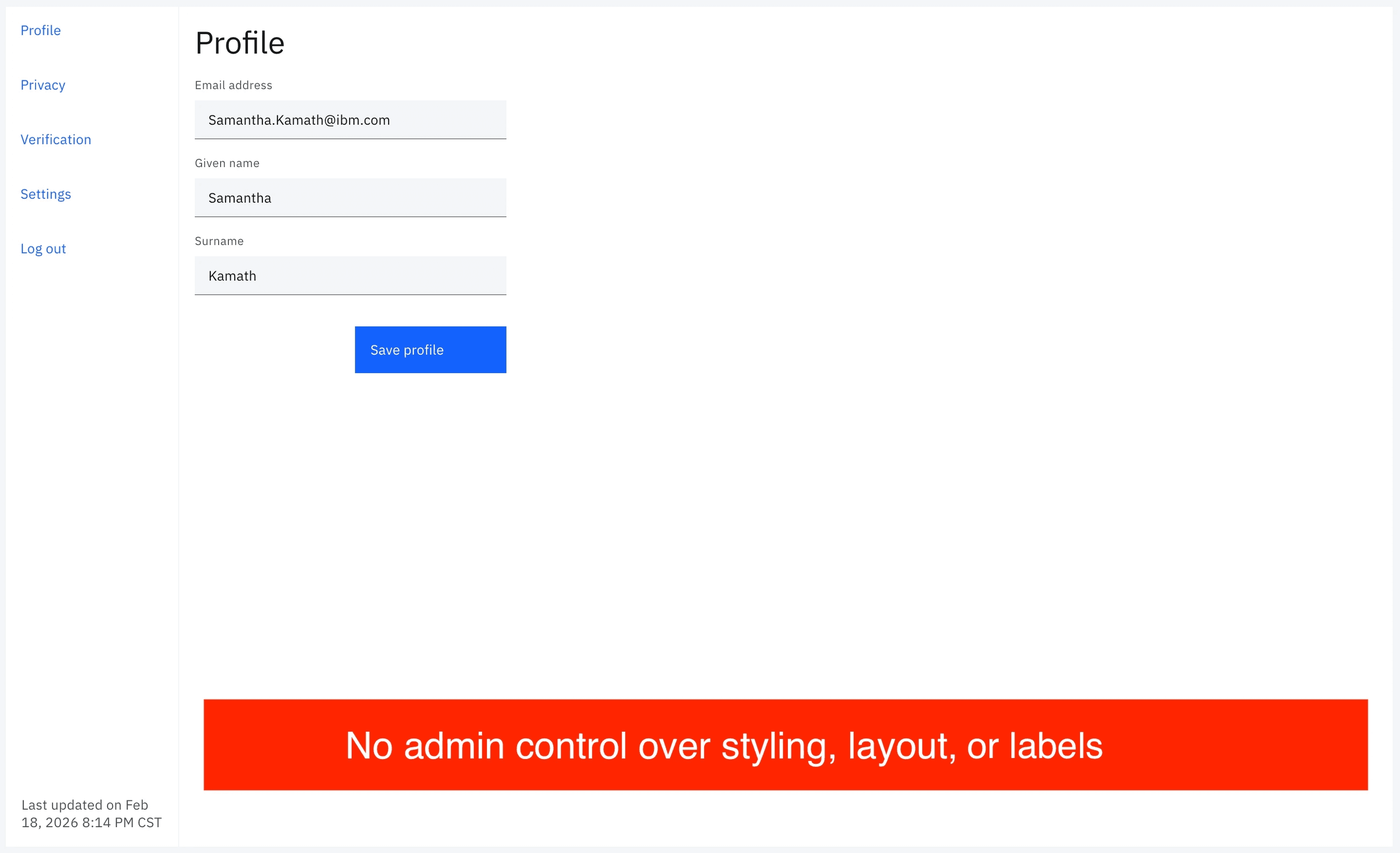
Before: static user profile

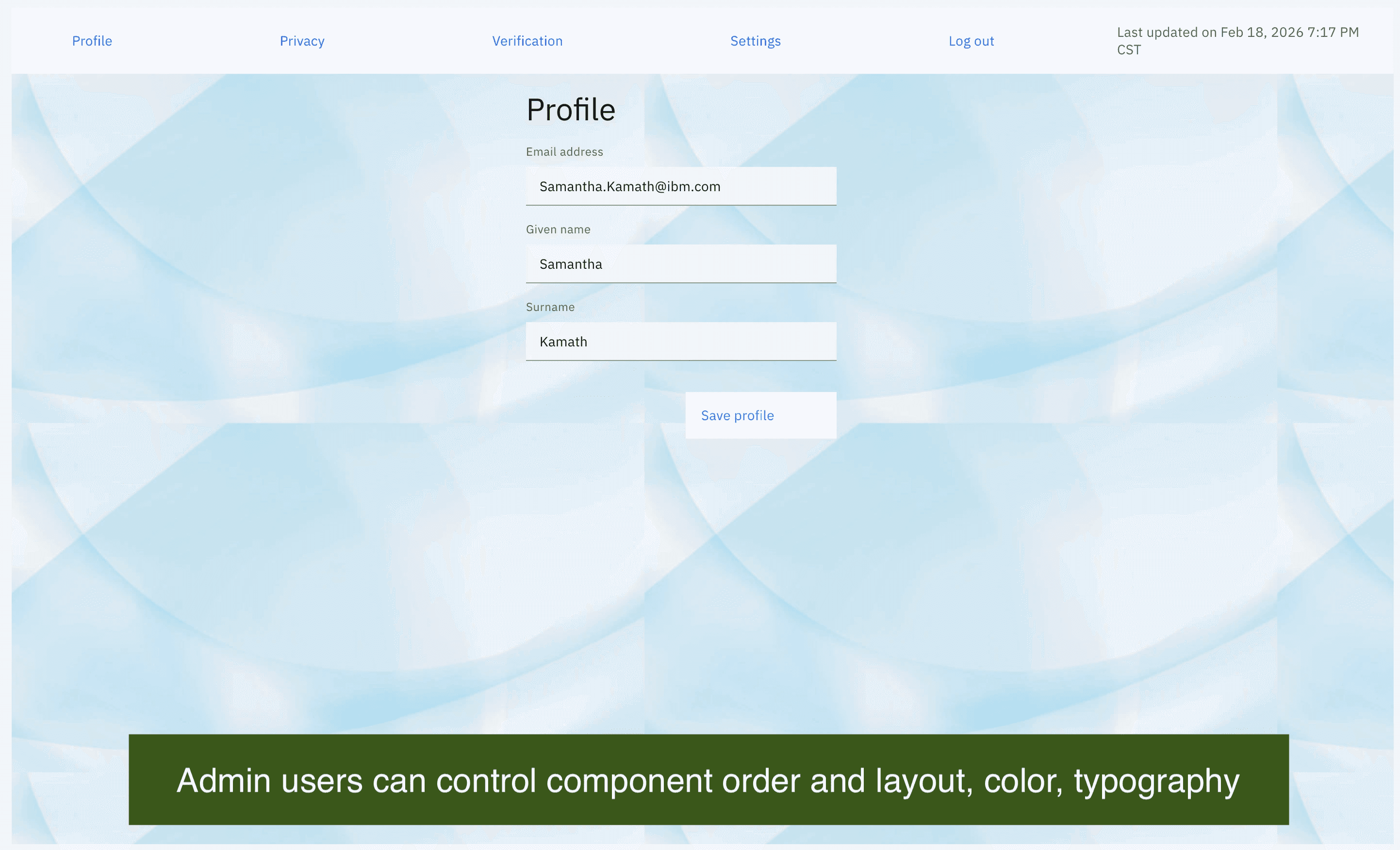
After: admin-customizable profile

YEAR

June 2023 - June 2024

ROLE

UX designer

UX developer

Technical mentor

Team

Samantha Kamath

Front End (Yeikol Herrera, Zach Hardesty)

Back End (Adriana Russell, Tonghui Qu, Irfan Makandar, Vivek Jain)

The Problem

Every enterprise client had the same layout, labels, components, and branding for their end user profile, with no ability to align this experience to their brand.

Two layers of the problem

• Business: Three major enterprise clients enterprise clients were blocked from fully expanding ISV without branding flexibility. They required customization abilities to curate an end user profile experience.

• Technical: ISV had an existing customization system where admins upload custom HTML templates, usually used in low-interaction screens of the application. However, this system was never designed to handle a page as interactive and complex as the user profile.

The Solution

The shipped solution enables enterprise admins to fully customize the user profile through ISV's existing template system with no additional engineering support.

Admins can now configure and add their own text content to labels, headers, and body text. They can customize component order by rearranging profile sections to match their information hierarchy. Admins can also add in their own visual style, adjusting colors, typography, and layout to align to their brand.

Key Challenges

There were significant technical constraints, requiring knowledge of engineering requirements and a focus on the user experience.

  1. Template architecture not designed for partials

ISV's existing customization system rendered templates as complete, standalone HTML pages.

The user profile needed to be assemble multiple partial templates into one cohesive screen. This had never been attempted, and there was no existing pattern.

  1. Full page refresh on every interaction

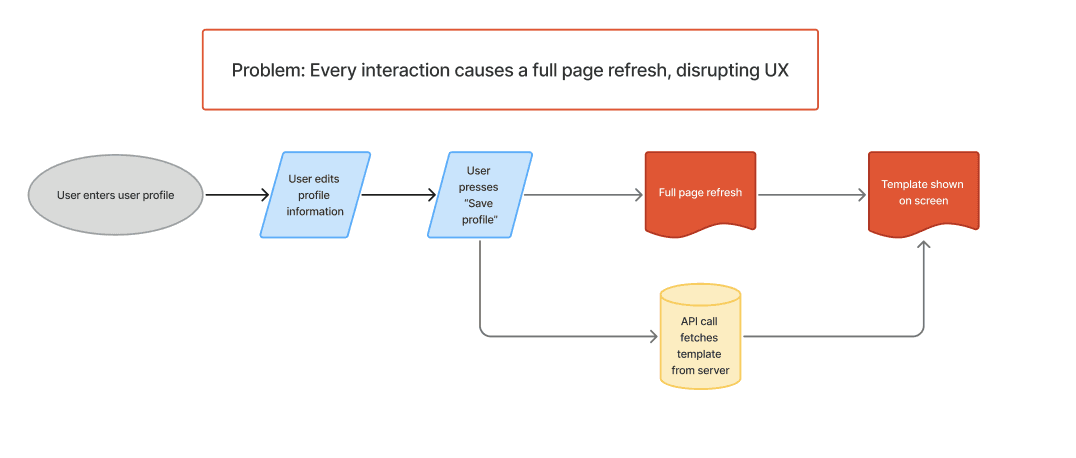
In ISV's template system, every user interaction that requests new data triggers an API call, which returns a template. That template replaces the current view, causing a full page refresh.

For a highly interactive user profile, this was unacceptable.. Every user input and interaction would cause a visual disruption. This was a fundamental UX problem baked into the architecture.

  1. Potential component quality loss

The existing profile was built in React using IBM's Carbon Design System component library. Converting to the template system meant a conversion to vanilla HTML and JavaScript.

This would mean either rebuilding every interactive component from scratch (high risk of visual and accessibility regressions) or shipping a degraded experience.

  1. Accessibility requirements (WCAG)

Any solution had to maintain full WCAG compliance. We couldn't afford introducing accessibility regressions.

  1. Visual fragmentation across microservices

The user profile needed to consume partial templates owned by other ISV microservices. Each of these templates had their own visual conventions, spacing, and component patterns.

Decision making

I needed to investigate multiple approaches and their tradeoffs to find the best option.

1: Rebuild in Vanilla HTML/JS — NO

Rewrite everything in plain HTML and JavaScript to align with the template architecture, mimicking the other templates. This would mean recreating every interactive component without the benefit of Carbon's tested component library.

Pro: The admin user would have full customizability without requiring knowledge of any component libraries.

Con: There was a high risk of visual regression, interaction bugs, and accessibility failures in a feature being shipped 300K+ users.

2: Carbon Design System Web Components — YES

Carbon Design System offers its components not just as React modules, but as framework-agnostic web components, usable in HTML.

Pro: The web components includes built-in accessibility compliance and preserves design consistency across IBM products.

Con: The admin user would require some understanding of Carbon Web components to customize the templates.


I chose the second option. The Carbon Web Component system was fairly intuitive to understand, and there was comprehensive documentation online. This option also prevented the most egregious UX regressions and allowed a quicker delivery timeline.

Ultimately, this solution provided the best balance between optimal user experience, customizability needs, and client-requested delivery timeline.
The process

Now, accessibility and most interaction states were handled by Carbon web components.

However, there were three main interaction and UX issues that needed to be fixed.

1: Loading states

Every API call caused a full page reload. A user clicking "Change password" on their profile section shouldn't feel like navigating to a new page.

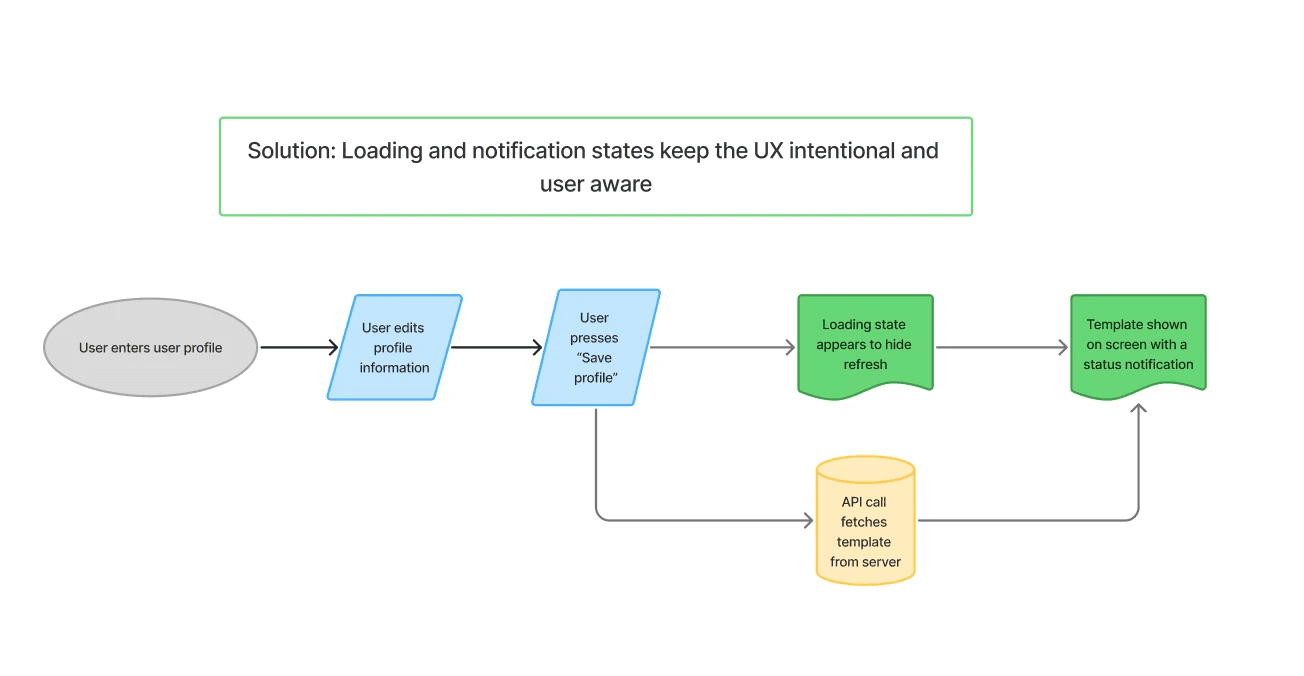
I created intentional transition states to mask the reload. I added a spinner to appear immediately on interaction, creating a system response instead of a system disruption.

I also structured the front end architecture to minimize the scope of what reloads on each interaction. In the new profile, a React base layer foundation hosts the templates. The React architecture dictates what page sections are repopulated with new views, while the template architecture handles the actual content. This limited visual disruption to users.

2: Notification states

There still wasn't enough system feedback for a user's inputs. I designed and developed notification states and how they displayed to the user. I included states for success, error, and loading conditions across all user inputs and interactive elements, ensuring users always remained informed on the state of their action.

3: Visual inconsistencies across templates

I also had to restyle partial templates that were pulled in from other microservices. Each template had their own styling, spacing, and components. I needed to align them with the user profile's visual language to create a unified user experience. This required normalizing spacing, unifying typography, adding custom interaction states, and adding custom styling to align with component patterns.

What I made

The final solution was a uniquely novel, composable partial template architecture, aligning multiple partial templates into a cohesive feature — the first of its kind in ISV. It integrates Carbon web components to maintain design system fidelity and WCAG compliance, while still enhancing loading and notification interaction patterns.

This feature was launched to 300K+ end users, unblocking major enterprise clients who required branding customization as a condition of continued adoption.

What I learned

The hardest challenge during this process wasn't the visual design, but rather protecting the user experience from technical architecture that threatened it.

Using my engineering background, I understood the root cause of the major UX issues, explored what was possible within the constraints, and created the necessary designs and architecture.

Next time, I would push for a more formal documentation of the problem space, the existing architecture, and the technical complexity. I would advocate for earlier design input to plan the architecture around the optimal UX design, rather than the other way around.

Smooth Scroll
This will hide itself!

IBM Verify User Profile: Enabling Brand Customization at Scale

OVERVIEW

IBM Security Verify (ISV) is an enterprise identity and access management (IAM) solution used by organizations to manage authentication, authorization, and user identity. Its user profile feature allows end users to manage their profile, privacy, and security settings. However, it was a fully static experience with no options for our clients to customize their company's end user experience. I acted as a design-developer, converting this static profile into a flexible, customizable template architecture for 300K+ users, unblocking major clients.

Before: static user profile

After: admin-customizable profile

YEAR

June 2023 - June 2024

ROLE

UX designer

UX developer

Technical mentor

Team

Samantha Kamath

Front End (Yeikol Herrera, Zach Hardesty)

Back End (Adriana Russell, Tonghui Qu, Irfan Makandar, Vivek Jain)

The Problem

Every enterprise client had the same layout, labels, components, and branding for their end user profile, with no ability to align this experience to their brand.

Two layers of the problem

• Business: Three major enterprise clients enterprise clients were blocked from fully expanding ISV without branding flexibility. They required customization abilities to curate an end user profile experience.

• Technical: ISV had an existing customization system where admins upload custom HTML templates, usually used in low-interaction screens of the application. However, this system was never designed to handle a page as interactive and complex as the user profile.

The Solution

The shipped solution enables enterprise admins to fully customize the user profile through ISV's existing template system with no additional engineering support.

Admins can now configure and add their own text content to labels, headers, and body text. They can customize component order by rearranging profile sections to match their information hierarchy. Admins can also add in their own visual style, adjusting colors, typography, and layout to align to their brand.

Key Challenges

There were significant technical constraints, requiring knowledge of engineering requirements and a focus on the user experience.

  1. Template architecture not designed for partials

ISV's existing customization system rendered templates as complete, standalone HTML pages.

The user profile needed to be assemble multiple partial templates into one cohesive screen. This had never been attempted, and there was no existing pattern.

  1. Full page refresh on every interaction

In ISV's template system, every user interaction that requests new data triggers an API call, which returns a template. That template replaces the current view, causing a full page refresh.

For a highly interactive user profile, this was unacceptable.. Every user input and interaction would cause a visual disruption. This was a fundamental UX problem baked into the architecture.

  1. Potential component quality loss

The existing profile was built in React using IBM's Carbon Design System component library. Converting to the template system meant a conversion to vanilla HTML and JavaScript.

This would mean either rebuilding every interactive component from scratch (high risk of visual and accessibility regressions) or shipping a degraded experience.

  1. Accessibility requirements (WCAG)

Any solution had to maintain full WCAG compliance. We couldn't afford introducing accessibility regressions.

  1. Visual fragmentation across microservices

The user profile needed to consume partial templates owned by other ISV microservices. Each of these templates had their own visual conventions, spacing, and component patterns.

Decision making

I needed to investigate multiple approaches and their tradeoffs to find the best option.

1: Rebuild in Vanilla HTML/JS — NO

Rewrite everything in plain HTML and JavaScript to align with the template architecture, mimicking the other templates. This would mean recreating every interactive component without the benefit of Carbon's tested component library.

Pro: The admin user would have full customizability without requiring knowledge of any component libraries.

Con: There was a high risk of visual regression, interaction bugs, and accessibility failures in a feature being shipped 300K+ users.

2: Carbon Design System Web Components — YES

Carbon Design System offers its components not just as React modules, but as framework-agnostic web components, usable in HTML.

Pro: The web components includes built-in accessibility compliance and preserves design consistency across IBM products.

Con: The admin user would require some understanding of Carbon Web components to customize the templates.


I chose the second option. The Carbon Web Component system was fairly intuitive to understand, and there was comprehensive documentation online. This option also prevented the most egregious UX regressions and allowed a quicker delivery timeline.

Ultimately, this solution provided the best balance between optimal user experience, customizability needs, and client-requested delivery timeline.
The process

Now, accessibility and most interaction states were handled by Carbon web components.

However, there were three main interaction and UX issues that needed to be fixed.

1: Loading states

Every API call caused a full page reload. A user clicking "Change password" on their profile section shouldn't feel like navigating to a new page.

I created intentional transition states to mask the reload. I added a spinner to appear immediately on interaction, creating a system response instead of a system disruption.

I also structured the front end architecture to minimize the scope of what reloads on each interaction. In the new profile, a React base layer foundation hosts the templates. The React architecture dictates what page sections are repopulated with new views, while the template architecture handles the actual content. This limited visual disruption to users.

2: Notification states

There still wasn't enough system feedback for a user's inputs. I designed and developed notification states and how they displayed to the user. I included states for success, error, and loading conditions across all user inputs and interactive elements, ensuring users always remained informed on the state of their action.

3: Visual inconsistencies across templates

I also had to restyle partial templates that were pulled in from other microservices. Each template had their own styling, spacing, and components. I needed to align them with the user profile's visual language to create a unified user experience. This required normalizing spacing, unifying typography, adding custom interaction states, and adding custom styling to align with component patterns.

What I made

The final solution was a uniquely novel, composable partial template architecture, aligning multiple partial templates into a cohesive feature — the first of its kind in ISV. It integrates Carbon web components to maintain design system fidelity and WCAG compliance, while still enhancing loading and notification interaction patterns.

This feature was launched to 300K+ end users, unblocking major enterprise clients who required branding customization as a condition of continued adoption.

What I learned

The hardest challenge during this process wasn't the visual design, but rather protecting the user experience from technical architecture that threatened it.

Using my engineering background, I understood the root cause of the major UX issues, explored what was possible within the constraints, and created the necessary designs and architecture.

Next time, I would push for a more formal documentation of the problem space, the existing architecture, and the technical complexity. I would advocate for earlier design input to plan the architecture around the optimal UX design, rather than the other way around.

Smooth Scroll
This will hide itself!

IBM Verify User Profile: Enabling Brand Customization at Scale

OVERVIEW

IBM Security Verify (ISV) is an enterprise identity and access management (IAM) solution used by organizations to manage authentication, authorization, and user identity. Its user profile feature allows end users to manage their profile, privacy, and security settings. However, it was a fully static experience with no options for our clients to customize their company's end user experience. I acted as a design-developer, converting this static profile into a flexible, customizable template architecture for 300K+ users, unblocking major clients.

Before: static user profile

After: admin-customizable profile

YEAR

June 2023 - June 2024

ROLE

UX designer

UX developer

Technical mentor

Team

Samantha Kamath

Front End (Yeikol Herrera, Zach Hardesty)

Back End (Adriana Russell, Tonghui Qu, Irfan Makandar, Vivek Jain)

The Problem

Every enterprise client had the same layout, labels, components, and branding for their end user profile, with no ability to align this experience to their brand.

Two layers of the problem

• Business: Three major enterprise clients enterprise clients were blocked from fully expanding ISV without branding flexibility. They required customization abilities to curate an end user profile experience.

• Technical: ISV had an existing customization system where admins upload custom HTML templates, usually used in low-interaction screens of the application. However, this system was never designed to handle a page as interactive and complex as the user profile.

The Solution

The shipped solution enables enterprise admins to fully customize the user profile through ISV's existing template system with no additional engineering support.

Admins can now configure and add their own text content to labels, headers, and body text. They can customize component order by rearranging profile sections to match their information hierarchy. Admins can also add in their own visual style, adjusting colors, typography, and layout to align to their brand.

Key Challenges

There were significant technical constraints, requiring knowledge of engineering requirements and a focus on the user experience.

  1. Template architecture not designed for partials

ISV's existing customization system rendered templates as complete, standalone HTML pages.

The user profile needed to be assemble multiple partial templates into one cohesive screen. This had never been attempted, and there was no existing pattern.

  1. Full page refresh on every interaction

In ISV's template system, every user interaction that requests new data triggers an API call, which returns a template. That template replaces the current view, causing a full page refresh.

For a highly interactive user profile, this was unacceptable.. Every user input and interaction would cause a visual disruption. This was a fundamental UX problem baked into the architecture.

  1. Potential component quality loss

The existing profile was built in React using IBM's Carbon Design System component library. Converting to the template system meant a conversion to vanilla HTML and JavaScript.

This would mean either rebuilding every interactive component from scratch (high risk of visual and accessibility regressions) or shipping a degraded experience.

  1. Accessibility requirements (WCAG)

Any solution had to maintain full WCAG compliance. We couldn't afford introducing accessibility regressions.

  1. Visual fragmentation across microservices

The user profile needed to consume partial templates owned by other ISV microservices. Each of these templates had their own visual conventions, spacing, and component patterns.

Decision making

I needed to investigate multiple approaches and their tradeoffs to find the best option.

1: Rebuild in Vanilla HTML/JS — NO

Rewrite everything in plain HTML and JavaScript to align with the template architecture, mimicking the other templates. This would mean recreating every interactive component without the benefit of Carbon's tested component library.

Pro: The admin user would have full customizability without requiring knowledge of any component libraries.

Con: There was a high risk of visual regression, interaction bugs, and accessibility failures in a feature being shipped 300K+ users.

2: Carbon Design System Web Components — YES

Carbon Design System offers its components not just as React modules, but as framework-agnostic web components, usable in HTML.

Pro: The web components includes built-in accessibility compliance and preserves design consistency across IBM products.

Con: The admin user would require some understanding of Carbon Web components to customize the templates.


I chose the second option. The Carbon Web Component system was fairly intuitive to understand, and there was comprehensive documentation online. This option also prevented the most egregious UX regressions and allowed a quicker delivery timeline.

Ultimately, this solution provided the best balance between optimal user experience, customizability needs, and client-requested delivery timeline.
The process

Now, accessibility and most interaction states were handled by Carbon web components.

However, there were three main interaction and UX issues that needed to be fixed.

1: Loading states

Every API call caused a full page reload. A user clicking "Change password" on their profile section shouldn't feel like navigating to a new page.

I created intentional transition states to mask the reload. I added a spinner to appear immediately on interaction, creating a system response instead of a system disruption.

I also structured the front end architecture to minimize the scope of what reloads on each interaction. In the new profile, a React base layer foundation hosts the templates. The React architecture dictates what page sections are repopulated with new views, while the template architecture handles the actual content. This limited visual disruption to users.

2: Notification states

There still wasn't enough system feedback for a user's inputs. I designed and developed notification states and how they displayed to the user. I included states for success, error, and loading conditions across all user inputs and interactive elements, ensuring users always remained informed on the state of their action.

3: Visual inconsistencies across templates

I also had to restyle partial templates that were pulled in from other microservices. Each template had their own styling, spacing, and components. I needed to align them with the user profile's visual language to create a unified user experience. This required normalizing spacing, unifying typography, adding custom interaction states, and adding custom styling to align with component patterns.

What I made

The final solution was a uniquely novel, composable partial template architecture, aligning multiple partial templates into a cohesive feature — the first of its kind in ISV. It integrates Carbon web components to maintain design system fidelity and WCAG compliance, while still enhancing loading and notification interaction patterns.

This feature was launched to 300K+ end users, unblocking major enterprise clients who required branding customization as a condition of continued adoption.

What I learned

The hardest challenge during this process wasn't the visual design, but rather protecting the user experience from technical architecture that threatened it.

Using my engineering background, I understood the root cause of the major UX issues, explored what was possible within the constraints, and created the necessary designs and architecture.

Next time, I would push for a more formal documentation of the problem space, the existing architecture, and the technical complexity. I would advocate for earlier design input to plan the architecture around the optimal UX design, rather than the other way around.

Smooth Scroll
This will hide itself!